


Call Block: Filter and Blocker
4.24.55K Reviews
App Specs
- Version
- 2.10.0.2281
- Updated On
- License
- Free
- Downloads
- 5,000,000+
- Developer
- Appsbuyout
- Categories
- Communication
- Platform
- Android
Screenshots
 Analysis by AppCompare
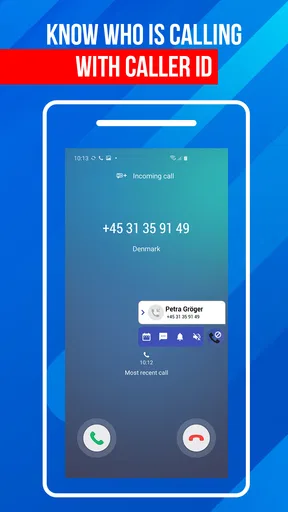
When an unknown number interrupts dinner, a work call, or a quiet stretch at home, I want to know whether I should answer without turning call management into a project. Call Block: Filter and Blocker is a communication app from Appsbuyout built around that practical problem. I’d approach it as a focused tool for identifying and blocking unwanted callers, not as a replacement for every phone feature or a guarantee that every nuisance call will disappear.
What to expect from a call-blocking app
The useful promise here is a calmer incoming-call routine: identify unfamiliar callers, block numbers you recognize as unwanted, and reduce interruptions from spam, fraud attempts, or robocalls. In practice, the value of any blocker depends on how much control you want. Some people prefer to screen every unfamiliar number themselves; others are happy to let a filter handle known nuisances. I’d start with a cautious approach and make the blocking rules stricter only after seeing how they fit my day.
This is a free app, with optional in-app purchases listed from $0.49 to $14.99 per item. It is rated for Everyone, and its current version is 2.9.0.2233 for devices running Android 10 or later. It has been available since July 21, 2016, and its 4.3 average from around 20,000 ratings, along with more than five million installs, suggests it has found an audience among people looking for a straightforward call filter. Those figures tell me it is established, but they do not replace checking whether its approach suits my own calling habits.
Getting started without overblocking
My first advice to a new user would be to avoid immediately blocking every number that is not saved in contacts. That setting can sound appealing if spam has become relentless, but it can also catch a delivery driver, a clinic, a school, or a business returning a call from a different line. If I expect an important call from someone new, I’d keep broad blocking off until that call has arrived, or use a narrower rule and review the results first.
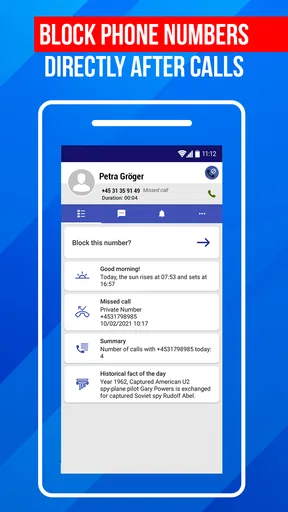
A safer first pass is to block a specific nuisance number after it has called, then check the app’s call history or blocked-number view so I can see what happened. If the app offers a whitelist, I’d use it for people whose calls must get through, rather than relying on memory when changing filters. That small bit of preparation is especially useful for anyone who shares a phone with family or uses one number for both personal and work calls.
There is a practical trade-off behind every filter: a rule that catches more unwanted calls may also require more attention to exceptions. I’d treat the settings as something to tune, not as a switch that can safely be set to maximum strictness for every person. People who rarely receive calls from unfamiliar numbers may prefer a firm block list; anyone waiting on appointments, job responses, or service callbacks should preserve room for legitimate unknown callers.
Using Call Block day to day
I’d use this section to think beyond the first blocked number and settle on a routine I can trust: check the blocked-call record when I have a quiet moment, and loosen or tighten rules when my needs change. That small review is especially helpful before a day when I’m expecting an unfamiliar caller. Next, I’d consider whether this focused blocker still fits how I handle calls overall.
Worth Reading Before You Choose

EA SPORTS FC Mobile 26 Is a Bigger Football Game, but It Takes Time

Flipboard Shows What News Apps Must Do Beyond the Feed

Switching to Android Auto Means Rethinking Your Driving Routine

Google Calendar Makes a Crowded Week Easier to Manage

Ludo King Makes the Most of the Minutes Between Plans

Baby Panda World Brings Quick Play to Modern Phones, but Its Game Library Feels Busy
First impressions and the first useful action
When I first opened Call Block: Filter and Blocker, I was taken aback by its slick and intuitive interface. It’s clean, easy to navigate, and doesn’t bombard you with ads right off the bat, which is always a win in my book. The main dashboard gives you a quick overview of your call history and blocked numbers, making it easy to get started without any complicated setups.
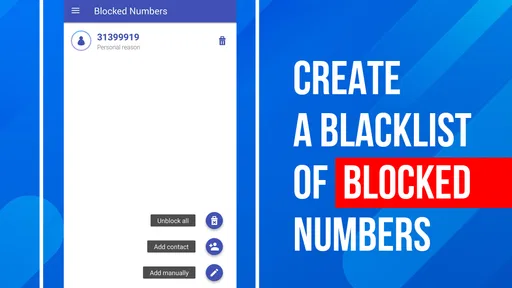
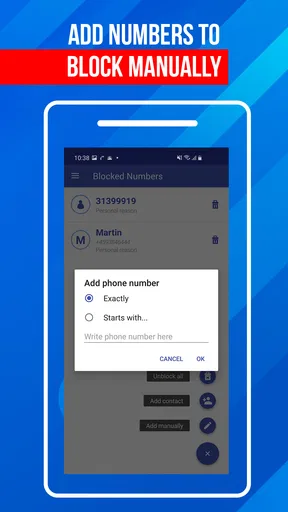
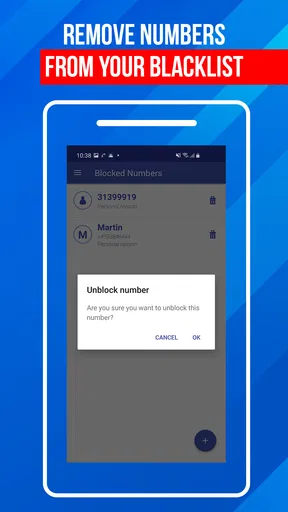
The first meaningful success I’d look for is not a dramatic silent phone; it is seeing one repeat nuisance handled in a way I understand. After an unwanted number calls, I can add it manually, then check that it appears in the blocked list. That gives me a clear, reversible starting point. If another call comes from the same number, the rule is already there, and I do not have to stop what I am doing to decide again.
Setting Up Your Filters
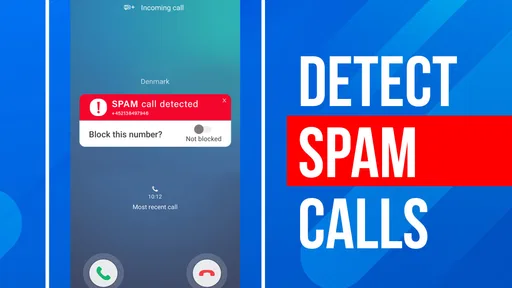
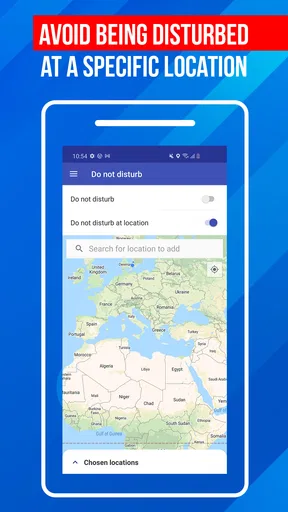
Setting up filters is straightforward. You can either block numbers manually or use the app’s built-in database of known spam numbers. I tried adding a few pesky numbers that had been annoying me for weeks, and it was as simple as pie. There’s also a handy option to block all unknown numbers if you’re in the mood to go all-out ninja mode and keep your phone eerily silent.
What I found particularly cool was the ability to create a whitelist. This feature ensures that important calls from friends or family never get blocked. You wouldn’t want to miss your mom’s call, right?
For a first-time user, a whitelist is more than a convenience: it is a way to make stricter filtering less risky. I’d add essential contacts before experimenting with broad unknown-number blocking, especially if I rely on calls for work or family responsibilities. A useful habit is to review the blocked list after changing a filter. If I notice a call I expected, I can adjust the rules before the same problem happens again.
Real-Time Call Blocking
One of the standout features of Call Block: Filter and Blocker is its real-time call blocking. As soon as a suspicious call comes in, the app swiftly identifies and blocks it. I tested this with a few known spam numbers, and it worked like a charm every time. No more rushing to hit the silence button during a meeting or a quiet evening. It’s all handled for you.
A realistic example is a day when I am expecting a work call but also get repeated interruptions from a number I already know is unwanted. Blocking that specific caller can remove one recurring distraction while leaving the rest of my incoming calls available. That is a better fit for a mixed personal-and-work phone than silencing every unfamiliar caller, because it solves the immediate problem without assuming that every new number is trouble.
Identification and blocking still require judgement. A number that looks unfamiliar may belong to a legitimate caller, and a filter cannot make every decision perfectly for every person. If I am waiting for a callback, I would avoid making the most restrictive setting my default and check call history rather than assuming that a quiet phone means no one tried to reach me. The key benefit is convenience, not a reason to stop paying attention altogether.
Customizable Alerts
Another feature I appreciated was the customizable alerts. You can choose different notification sounds for blocked calls, giving you a heads-up without even picking up your phone. It’s a small touch, but it makes a big difference in personalizing the experience.
I’d keep those alerts useful rather than noisy. If I want a record that a blocked call occurred but do not want another interruption during a meeting, a quieter alert choice makes more sense than a prominent sound. The point is to separate awareness from disruption: I can stay informed enough to review what happened later without letting every blocked attempt demand immediate attention.
User Experience and common confusion
Using the app on a daily basis, I found it to be lightweight and efficient. It doesn't drain my battery, which is always a plus for those of us constantly battling with low battery levels. The app updates its spam database regularly, ensuring it stays ahead of the curve with new spam tactics.
One thing I’d love to see in future updates is more analytics about blocked calls. While the app does provide some basic stats, I’m a sucker for detailed insights into who’s trying to reach me.
A common source of confusion with call blockers is treating identification, blocking, and notification as if they were the same thing. Identification helps me judge an incoming number; a blocking rule determines whether it should be stopped; an alert tells me what the app did. I’d check these separately when something feels wrong. If a call still gets through, I would first review whether that number is covered by a rule rather than assuming the entire app has failed.
Another sensible check is whether my own choices have become too broad. If an expected call does not arrive, I would look at the whitelist and blocked-call history before adding more filters. This is particularly important when the phone is used for appointments or deliveries, where callers may use numbers that are not in my contacts. A little review after setup can prevent a useful blocker from becoming a reason to miss something important.
Who will get the most from it
I can see this app working best for someone who receives repeated nuisance calls and wants a simple way to block known offenders without managing a complicated phone-security suite. It is also a reasonable choice for someone who prefers a visible list of blocked numbers and wants to build a personal set of rules over time. The combination of manual blocking and a spam-number database gives a newcomer more than one way to begin, while a whitelist offers a practical safeguard for important contacts.
I would be more cautious about recommending it to someone who expects every unknown call to be harmlessly screened, or who cannot afford to miss calls from numbers they have never saved. In those situations, the phone’s built-in call-screening options or a less aggressive setup may be a better match. Likewise, if detailed reports are the main reason for installing an app, the basic statistics here may feel limited; I would not choose it primarily for deep call analytics.
Compared with relying only on a phone’s built-in blocking, this app is appealing if I want a dedicated place to manage unwanted numbers and use a spam database. The built-in option can be enough for a person who only needs to block an occasional caller and wants fewer apps to maintain. A broader security or caller-identification service may suit someone seeking more extensive tools, but it can also add complexity. I’d choose this focused app when the main goal is reducing unwanted calls, rather than expecting it to manage every aspect of phone security.
Is It Worth It?
So, is Call Block: Filter and Blocker worth downloading? If you're tired of dodging calls from unknown numbers and want a simple, effective solution, then absolutely. It's user-friendly, efficient, and it does exactly what it says on the tin. The peace of mind it brings is priceless.
My practical recommendation is to begin with individual number blocking, protect essential contacts with the whitelist, and only then decide whether a broader unknown-caller rule is worth the trade-off. That sequence gives a first-time user a clear path from installation to a useful result while keeping the risk of missed legitimate calls in view. If the app’s approach suits your routine, you can gradually rely on it more; if you need every unfamiliar caller to reach you, keep the rules selective.
In conclusion, whether you're plagued by spam calls or just want to streamline your call list, this app is a worthy addition to your digital toolbox. Give it a try, and you might just find yourself wondering how you ever lived without it.
Pros
- Easy to use interface for quick setup.
- Customizable block lists for flexibility.
- Low battery consumption during use.
- Effective spam call detection and blocking.
- Regular updates enhance app performance.
Cons
- Might block desired calls occasionally.
- Limited features in free version.
- Ads can be intrusive at times.
- Requires access to contacts for full functionality.
- Some features need a stable internet connection.
FAQs for Call Block: Filter and Blocker
What features does Call Block: Filter and Blocker offer?
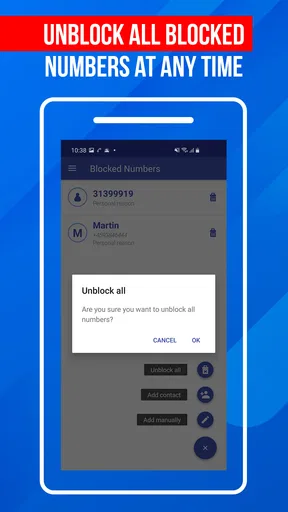
Call Block: Filter and Blocker provides comprehensive call management features, including blocking unwanted calls, filtering spam numbers, and creating custom block lists. It also allows users to report spam numbers to help the community stay safe. Additionally, it offers call logs and analytics to track blocked and filtered calls.
Is Call Block: Filter and Blocker easy to set up and use?
Yes, Call Block: Filter and Blocker is designed with user-friendliness in mind. The app features a straightforward setup process with intuitive navigation. Users can easily add numbers to their block list or enable automatic spam filtering with just a few taps, making it accessible for all experience levels.
Does Call Block: Filter and Blocker require a subscription or payment?
While Call Block: Filter and Blocker offers a free version with essential features, it may also offer a premium version with additional functionalities such as advanced analytics and priority support. Users can choose to subscribe if they wish to access these enhanced features for a more robust call management experience.
How does Call Block: Filter and Blocker ensure privacy and data security?
Call Block: Filter and Blocker prioritizes user privacy and data security by employing encryption and secure data handling practices. The app only uses necessary permissions to function and does not share personal data with third parties. Users can review the app’s privacy policy for detailed information on data handling.
Will Call Block: Filter and Blocker affect my phone’s performance?
Call Block: Filter and Blocker is optimized to function efficiently without significantly impacting your phone's performance. It runs in the background with minimal resource usage, ensuring that your device remains responsive and battery-friendly while you continue to enjoy a seamless user experience.


